Mobile Application
CalcBox – All-In-One Calculator App
Client: Realbyte
Services Provided
Mobile App Development
Client Overview / Project Background
Realbyte Inc., a well-known mobile solutions developer, had the vision for an all-in-one utility software that would get rid of the clutter of using multiple single-purpose calculator and converter apps. They wanted to give customers a unified experience for everything from simple math to complicated financial planning, all in a sleek, lightweight Android app. Realbyte wanted a solution that was powerful, scalable, and easy to use, catering to a global audience with varying utility needs, including students, professionals, fitness enthusiasts, and travellers.
Business Goals
The primary goal of the CalcBox project was to create all rounder calculator suite offering:
A wide range of tools, including general and scientific calculators, finance, health, academic, and planning modules
Offline Support for basic tools like currency calculators and unit conversions
Personal data retention for features like BMI tracking and GPA logs
A lightweight footprint with the optimal performance on all devices
The main goal was to increase user acquisition, boost retention and establish a long-term utility solution that everyday user could trust.
Objectives / Challenge
Building this kind of multi-functional app was not without its hurdles. Key technological and strategic challenges were:
Tool Consolidation: merging more than 20 separate calculator tools into a single performant application without bloating the app size or impacting performance.
Intuitive UX: Making sure that users could easily navigate between a wide variety of tools without feeling lost or overwhelmed.
Offline Capability: implementing reliable caching methods to allow
conversions and calculations without internet connectivity.
Data Persistence: Letting users store and retrieve personal information, such fitness logs and school records, across several sessions.
Global Accessibility: Supporting localization and regional formats to appeal to a worldwide user base.
Modular Scalability: Designing the app's architecture to support future expansion without having to rebuild the code or performance degradation.
Solutions Provided
To fulfill these requirements, our development team created a modular, scalable Android app tailored for everyday usability and long-term maintainability. Each tool was implemented as a standalone module that could be built, tested, and maintained on its own, ensuring speed, scalability and stability.
Technologies Used
Programming Language: Java (Android SDK)
Architecture: MVVM (Model-View-ViewModel) for clean code separation and reactive data binding
Local Database: SQLite for storing historical records like GPA tracking, BMI logs, and fuel calculations
UI Framework: Material Design components with dynamic layouts for device adaptability
External APIs: Currency exchange API with caching mechanisms for offline conversions
Core Modules Delivered
We custom built each tool specifically keeping in mind the user context and real world functionality. The final app included:
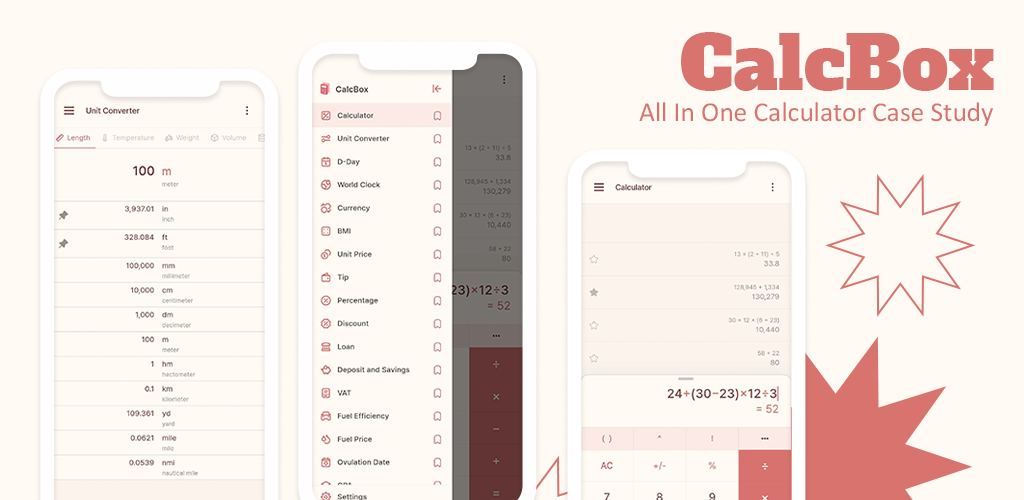
General Calculators: Standard and scientific calculator modes
Unit Converters: Length, weight, volume, temperature, area, speed, and more
Financial Tools: Loan calculator, savings estimator, VAT & tip calculators, discount calculators
Health Metrics: BMI, BMR, calorie burn estimators, ovulation calculator
Time & Date Utilities: D-Day counters, age calculators, time zone converters
Academic Tools: GPA calculator, study planner
Commerce Utilities: Unit price calculator, fuel cost efficiency tracker
History Tracking: Local storage of all user-generated data
Each module was made to respond quickly, intuitive layout, and offline compatibility where possible.
UX/UI Strategy
The concept behind the CalcBox design focused on simplicity, clarity, and rapid task execution. Through user testing, the UI was improved and included:
Tab-Based Navigation: Users could quickly jump between categories like Health, Finance, Time, and General
Contextual Grouping: Tools were organized by user intent, making discovery fast and frictionless
Iconography and Colour Codes: Enhanced tool recognition and visual appeal
Save/Edit Features: Users could update previous entries and track progress over time
Responsive Layouts: Optimised for all screen sizes and Android versions
Workflow
We used the Agile technique and a sprint-based delivery framework to plan our development lifecycle:
1. Finding out and Plannings
Conducted market research to find the best useful tools and define the main types of users.
2. UI/UX Design
Created wireframes and high-fidelity prototypes that followed the Material Design standards.
3. Development Based on Modules
Each calculator was built as a standalone module with its own logic and user interface.
4. Integration phrase
Used MVVM to merge all the tools into a single app shell that could still be responsive and modular.
5. Quality Assurance and Testing
Conducted comprehensive unit tests, device tests, and performance benchmarks. Focused on app launching time, stopping crashes, and memory use.
6. Release and Feedback Cycle
Published the app in the Google Play Store. Real-time analytics and user feedback systems for continuous improvement.
Outcomes
CalcBox not only surpassed the technical requirements, but it also exceeded client and user expectations across multiple metrics:
1 Million+ Downloads on Google Play
4.8+ Average Rating maintained over 12 months
50+ Tools in a Single App, all under 25MB
High Retention Rate, largely due to offline functionality and diverse use cases
Featured Multiple Time in Google Play’s Utility & Productivity categories
Positive User Reviews consistently highlighting the apps performance,simplicity and seamless navigation
Client Feedback
Realbyte Inc. got a marked increase in user acquisition compared to their previous calculator applications. Users specifically praised:
The easy-to-use and clean interface
Reliable offline Tools
personal data persistence
Useful and varied built-in calculators
Many users even replaced multiple apps with CalcBox, calling it their go-to utility solution.
Conclusion
CalcBox is a great illustration of how robust architecture, smart modular design, and a focus on the user experience can culminate in a high performing mobile utility app. CalcBox is a daily must-have for more than a million people around the world, from academics keeping track of their GPAs to travellers figuring out currency exchange.
We helped Realbyte make a truly universal calculator software by blending technical accuracy with human-centric design.
Realbyte Inc., a well-known mobile solutions developer, had the vision for an all-in-one utility software that would get rid of the clutter of using multiple single-purpose calculator and converter apps. They wanted to give customers a unified experience for everything from simple math to complicated financial planning, all in a sleek, lightweight Android app. Realbyte wanted a solution that was powerful, scalable, and easy to use, catering to a global audience with varying utility needs, including students, professionals, fitness enthusiasts, and travellers.
Business Goals
The primary goal of the CalcBox project was to create all rounder calculator suite offering:
A wide range of tools, including general and scientific calculators, finance, health, academic, and planning modules
Offline Support for basic tools like currency calculators and unit conversions
Personal data retention for features like BMI tracking and GPA logs
A lightweight footprint with the optimal performance on all devices
The main goal was to increase user acquisition, boost retention and establish a long-term utility solution that everyday user could trust.
Objectives / Challenge
Building this kind of multi-functional app was not without its hurdles. Key technological and strategic challenges were:
Tool Consolidation: merging more than 20 separate calculator tools into a single performant application without bloating the app size or impacting performance.
Intuitive UX: Making sure that users could easily navigate between a wide variety of tools without feeling lost or overwhelmed.
Offline Capability: implementing reliable caching methods to allow
conversions and calculations without internet connectivity.
Data Persistence: Letting users store and retrieve personal information, such fitness logs and school records, across several sessions.
Global Accessibility: Supporting localization and regional formats to appeal to a worldwide user base.
Modular Scalability: Designing the app's architecture to support future expansion without having to rebuild the code or performance degradation.
Solutions Provided
To fulfill these requirements, our development team created a modular, scalable Android app tailored for everyday usability and long-term maintainability. Each tool was implemented as a standalone module that could be built, tested, and maintained on its own, ensuring speed, scalability and stability.
Technologies Used
Programming Language: Java (Android SDK)
Architecture: MVVM (Model-View-ViewModel) for clean code separation and reactive data binding
Local Database: SQLite for storing historical records like GPA tracking, BMI logs, and fuel calculations
UI Framework: Material Design components with dynamic layouts for device adaptability
External APIs: Currency exchange API with caching mechanisms for offline conversions
Core Modules Delivered
We custom built each tool specifically keeping in mind the user context and real world functionality. The final app included:
General Calculators: Standard and scientific calculator modes
Unit Converters: Length, weight, volume, temperature, area, speed, and more
Financial Tools: Loan calculator, savings estimator, VAT & tip calculators, discount calculators
Health Metrics: BMI, BMR, calorie burn estimators, ovulation calculator
Time & Date Utilities: D-Day counters, age calculators, time zone converters
Academic Tools: GPA calculator, study planner
Commerce Utilities: Unit price calculator, fuel cost efficiency tracker
History Tracking: Local storage of all user-generated data
Each module was made to respond quickly, intuitive layout, and offline compatibility where possible.
UX/UI Strategy
The concept behind the CalcBox design focused on simplicity, clarity, and rapid task execution. Through user testing, the UI was improved and included:
Tab-Based Navigation: Users could quickly jump between categories like Health, Finance, Time, and General
Contextual Grouping: Tools were organized by user intent, making discovery fast and frictionless
Iconography and Colour Codes: Enhanced tool recognition and visual appeal
Save/Edit Features: Users could update previous entries and track progress over time
Responsive Layouts: Optimised for all screen sizes and Android versions
Workflow
We used the Agile technique and a sprint-based delivery framework to plan our development lifecycle:
1. Finding out and Plannings
Conducted market research to find the best useful tools and define the main types of users.
2. UI/UX Design
Created wireframes and high-fidelity prototypes that followed the Material Design standards.
3. Development Based on Modules
Each calculator was built as a standalone module with its own logic and user interface.
4. Integration phrase
Used MVVM to merge all the tools into a single app shell that could still be responsive and modular.
5. Quality Assurance and Testing
Conducted comprehensive unit tests, device tests, and performance benchmarks. Focused on app launching time, stopping crashes, and memory use.
6. Release and Feedback Cycle
Published the app in the Google Play Store. Real-time analytics and user feedback systems for continuous improvement.
Outcomes
CalcBox not only surpassed the technical requirements, but it also exceeded client and user expectations across multiple metrics:
1 Million+ Downloads on Google Play
4.8+ Average Rating maintained over 12 months
50+ Tools in a Single App, all under 25MB
High Retention Rate, largely due to offline functionality and diverse use cases
Featured Multiple Time in Google Play’s Utility & Productivity categories
Positive User Reviews consistently highlighting the apps performance,simplicity and seamless navigation
Client Feedback
Realbyte Inc. got a marked increase in user acquisition compared to their previous calculator applications. Users specifically praised:
The easy-to-use and clean interface
Reliable offline Tools
personal data persistence
Useful and varied built-in calculators
Many users even replaced multiple apps with CalcBox, calling it their go-to utility solution.
Conclusion
CalcBox is a great illustration of how robust architecture, smart modular design, and a focus on the user experience can culminate in a high performing mobile utility app. CalcBox is a daily must-have for more than a million people around the world, from academics keeping track of their GPAs to travellers figuring out currency exchange.
We helped Realbyte make a truly universal calculator software by blending technical accuracy with human-centric design.
Ready to scale?
Bring your next digital transformation to life.
Our experts can help you design, build, and launch software that improves efficiency and customer experience.
Contact Us