Mobile Application
Account Manager App; Ledger Book
Client: Ledger Book
Services Provided
Mobile App Development
The client works in the personal finance and accounting space, and the goal was to build a mobile-first solution to make managing accounts easier offline every day. The target users are professionals, small business owners, and contractors who usually keep track of their finances by hand in diaries.
Business Goals:
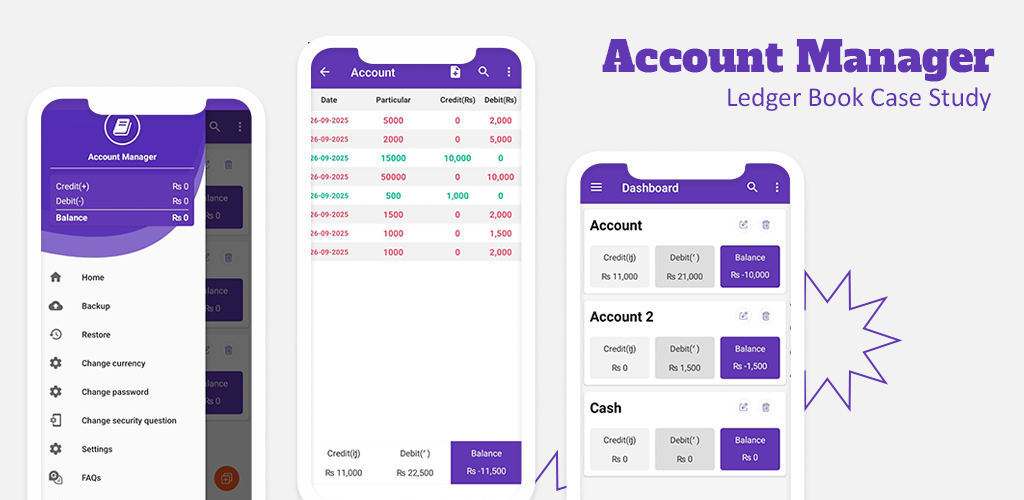
The main goal was to make an Android app that works offline and safely stores credit and debit transactions. The app had to have a clean, easy-to-use interface and support password protection, PDF generation, handling multiple currencies, and a way to back up and restore data.
Challenges:
We had to deal with several real-world problems to make this vision a reality:
There was no digital system to keep track of and manage daily transactions.
Users didn't have a safe and easy way to store sensitive financial information.
There was no way to make financial summaries that could be shared.
Need for an offline solution that doesn't use a lot of resources.
Need for sorting transactions by date and supporting multiple currencies.
These weren't just technical problems; they were "usability puzzles" that needed a lot of understanding of the end user.
Solutions Delivered
We built a robust Android app that is user optimised supporting complex business logic for all non-technical users. It offers usability, offline reliability and efficiency.
Technologies Used
Programming Language: Java
Local Storage: SQLite
UI/UX: Native Android (XML) with custom adaptors
Security: Shared Preferences with encrypted passwords
Reporting Exports: PDF and Excel support
Backup/Restore: Local storage solution based on file I/O
Main Features Delivered
Module for managing accounts (entities: individual, employee, party).
A transaction engine for credit and debit entries balanced calculations in real time.
Making PDF reports offline.
Password protection for local app access.
Multiple currency support system.
Sorting and filtering transaction history chronologically.
A reminder and settings module for regular backup prompts.
UX/UI Strategy
The app was made with a mobile first approach. Some key concerns were:
UI with big interactive elements for seamless navigation.
Easy-to-read fonts and intuitive layouts.
Minimal design with high contrast and touch friendly buttons.
Architecture that works offline for consistent performance.
Process and Workflow
Development went through a streamlined agile process:
1. Information Gathering: a closer look at user personas and use cases.
2. UI/UX Wireframing: Made wireframes that were both low- and high-fidelity.
3. Development: Built core modules that work offline.
4. QA and Testing: App testing on a variety of devices and Android versions.
5. Deployment: Released to the Google Play Store and set up to collect structured user feedback.
6. Maintenance: post launch updates and changes based on user reviews and real-time analytics.
Client Feedback:
After the launch, the client reported increased user engagement and subscription revenue. Highly positive feedback was noted regarding app’s usability and flexibility among various business types. Their users loved core features like the ability to work offline capability, password protection, and exporting to PDF.
Conclusion
The Accounts Manager app shows how an offline-first approach and targeted technical design can make old-fashioned manual workflows digital. The app addresses problems of many users managing their own or small-scale finances by efficiently handling local data and providing a safe mobile experience.
Business Goals:
The main goal was to make an Android app that works offline and safely stores credit and debit transactions. The app had to have a clean, easy-to-use interface and support password protection, PDF generation, handling multiple currencies, and a way to back up and restore data.
Challenges:
We had to deal with several real-world problems to make this vision a reality:
There was no digital system to keep track of and manage daily transactions.
Users didn't have a safe and easy way to store sensitive financial information.
There was no way to make financial summaries that could be shared.
Need for an offline solution that doesn't use a lot of resources.
Need for sorting transactions by date and supporting multiple currencies.
These weren't just technical problems; they were "usability puzzles" that needed a lot of understanding of the end user.
Solutions Delivered
We built a robust Android app that is user optimised supporting complex business logic for all non-technical users. It offers usability, offline reliability and efficiency.
Technologies Used
Programming Language: Java
Local Storage: SQLite
UI/UX: Native Android (XML) with custom adaptors
Security: Shared Preferences with encrypted passwords
Reporting Exports: PDF and Excel support
Backup/Restore: Local storage solution based on file I/O
Main Features Delivered
Module for managing accounts (entities: individual, employee, party).
A transaction engine for credit and debit entries balanced calculations in real time.
Making PDF reports offline.
Password protection for local app access.
Multiple currency support system.
Sorting and filtering transaction history chronologically.
A reminder and settings module for regular backup prompts.
UX/UI Strategy
The app was made with a mobile first approach. Some key concerns were:
UI with big interactive elements for seamless navigation.
Easy-to-read fonts and intuitive layouts.
Minimal design with high contrast and touch friendly buttons.
Architecture that works offline for consistent performance.
Process and Workflow
Development went through a streamlined agile process:
1. Information Gathering: a closer look at user personas and use cases.
2. UI/UX Wireframing: Made wireframes that were both low- and high-fidelity.
3. Development: Built core modules that work offline.
4. QA and Testing: App testing on a variety of devices and Android versions.
5. Deployment: Released to the Google Play Store and set up to collect structured user feedback.
6. Maintenance: post launch updates and changes based on user reviews and real-time analytics.
Client Feedback:
After the launch, the client reported increased user engagement and subscription revenue. Highly positive feedback was noted regarding app’s usability and flexibility among various business types. Their users loved core features like the ability to work offline capability, password protection, and exporting to PDF.
Conclusion
The Accounts Manager app shows how an offline-first approach and targeted technical design can make old-fashioned manual workflows digital. The app addresses problems of many users managing their own or small-scale finances by efficiently handling local data and providing a safe mobile experience.
Results
KPIs and performance metrics after launch:
More than 10,000 installs on Google Play in 6 months
An average rating of 4.5 stars based on real user reviews
More than 3,000 active users every month
More than 65% of users make PDFs on a regular basis
The average session time exceeded 4 minutes per user
80% of users praised offline access as a key feature
No data loss because of the backup system
Ready to scale?
Bring your next digital transformation to life.
Our experts can help you design, build, and launch software that improves efficiency and customer experience.
Contact Us